 1 / 9
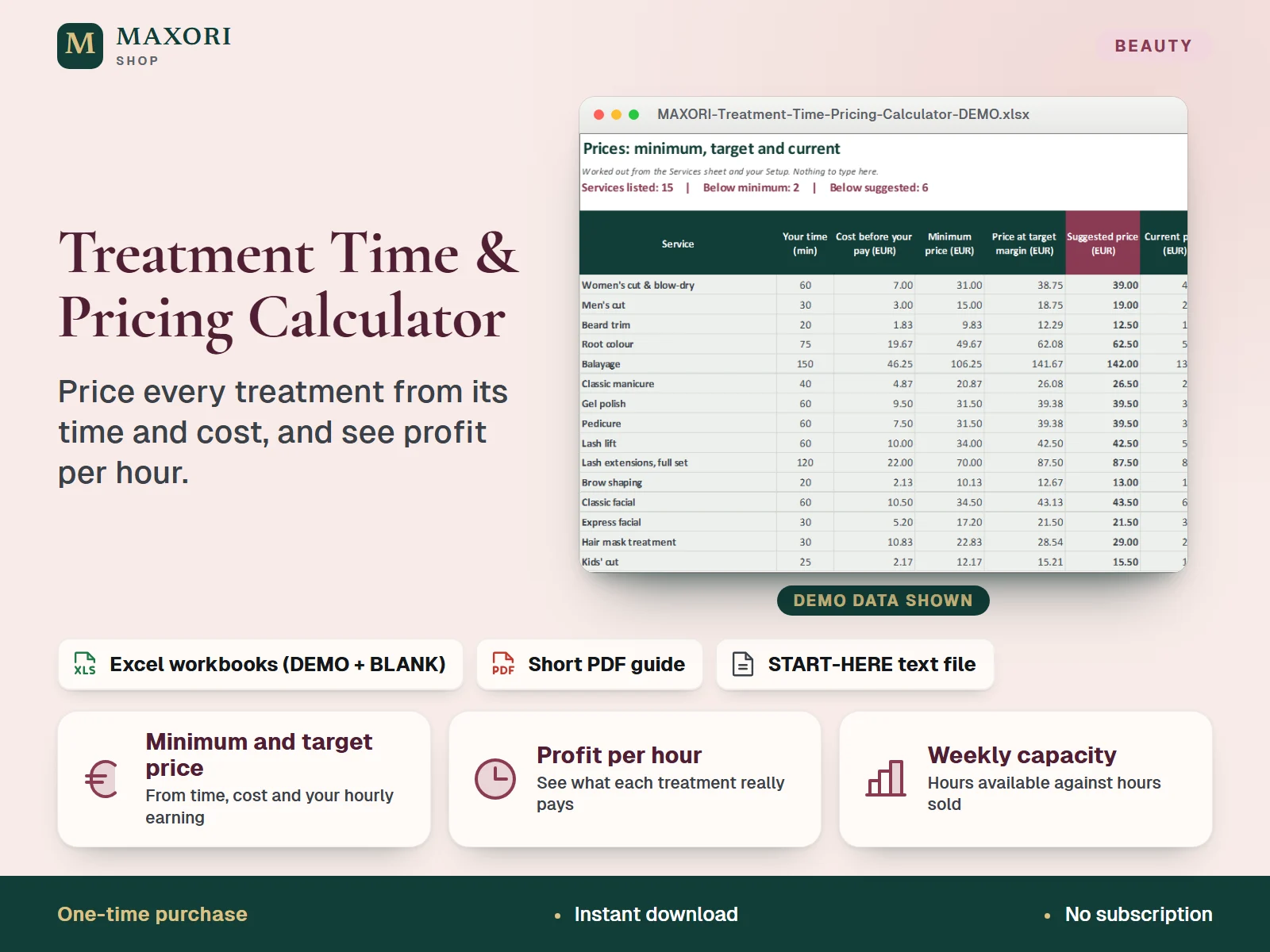
1 / 9An Excel (XLSX) workbook for salons, barbers, nail, lash, brow and skin professionals and rent-a-chair freelancers. For each treatment you enter your time, optional assistant time, product cost per treatment and your current price, plus the hourly earning you want or a target margin. The workbook gives the minimum price, the suggested price at your target margin, profit per treatment and per hour, how your current price compares, a what-if for a price change, and a weekly view of hours available against hours sold. Up to 40 services. A 2-page PDF guide is included, and each language comes as a fictional DEMO and an empty BLANK workbook in English, Italian, Spanish, French and German.
The problem it solves
Prices are often copied from a neighbour or from last year, so a long treatment with expensive products can quietly earn less per hour than a quick one, and nobody sees it until the week is full and the money is not there.
Who it is for
Salon and barbershop owners, nail, lash, brow and skin professionals and rent-a-chair freelancers who set their own prices and want them to rest on time and cost, not on guesswork or on what the salon down the road charges.
What you get
- Minimum price for each treatment: product cost, assistant time and overhead covered, and your wanted hourly earning paid
- Suggested price at your target margin, rounded up to the step you choose (for example 0.50 or 5)
- Profit per treatment and per hour, and your real hourly earning, at your current price
- A clear status for every service: below minimum, below suggested or OK
- A what-if column: change all prices by a percentage or type a new price for one service and see the weekly profit change
- A weekly capacity view of hours available against hours sold, with free hours and revenue and profit for a typical week
How you use it
- Download and extract the ZIP, open your language folder and the DEMO workbook to see how it works.
- Open the BLANK workbook, save a working copy and fill Setup: business name, currency label, the hourly earning you want, target margin, assistant cost per hour, optional overhead per hour and a rounding step.
- In Services, add one row per treatment: your time in minutes, assistant minutes if any, product cost, current price and treatments per week.
- Read Prices for the minimum price, the price at target margin, the suggested price and the status of your current price.
- Use What-if to test a price change, and Capacity to compare the hours you can work with the hours your treatments take.
Questions
Does it work for a freelancer who rents a chair?
Yes. Enter your own time and product cost, set the hourly earning you want and the overhead per hour (for example your chair rent divided by the hours you work), and the workbook shows the price you need.
What is the difference between the minimum price and the suggested price?
The minimum price covers your costs and pays you the hourly earning you want. The suggested price adds your target margin on top and is rounded up to the step you choose.
Does it calculate VAT or sales tax?
No. Enter every price and cost the same way, all with or all without VAT, and keep tax matters with a qualified professional.
How is it different from Beauty Menu Studio, Salon Profit & Performance Tracker, Salon Retail Stock & Margin Sheet, Holiday Season Promotion Planner or Price & Margin Studio?
Beauty Menu Studio designs the printed price menu, the Performance Tracker records revenue and expenses, the Retail Stock sheet tracks products you sell, the Holiday planner checks offers for a season and Price & Margin Studio prices made products. This workbook prices the treatment itself, from its time and cost, and tests whether your week can hold the work.
What is the difference between DEMO and BLANK?
The DEMO workbook holds a fictional studio with 15 services so you can see every sheet working. The BLANK workbook is the same file, empty and ready for your own treatments.
What is included
- 5 language folders: English, Italian, Spanish, French, German
- In each folder: a DEMO workbook with a fictional beauty studio (15 services), an empty BLANK workbook and a 2-page PDF guide
- Six sheets in every workbook: Start Here, Setup, Services, Prices, What-if and Capacity
- START-HERE.txt in all five languages; 21 files in total
Requirements
Desktop Microsoft Excel (not included). The formulas were recalculated in desktop Excel with 0 errors. Google Sheets, Excel for Mac and phone apps were not tested.
Version 1.0
Good to know
- No tax or VAT is calculated: enter all prices and costs the same way, all with or all without VAT. It is a calculation tool, not accounting, tax, legal or medical advice.
- It prices one treatment from its time and cost. It is not a price list maker, a stock sheet, a commission or payroll tool, and it includes no platform or booking fee tables.
- A suggested price is a calculation, not proof that clients will pay it. The what-if assumes the same number of treatments per week; demand may change.
- Results are only as good as the times and costs you enter. Overhead per hour is a figure you type; it is not worked out for you.
- Capacity: 40 services. Do not insert or delete rows. Manual entry only, one currency label, no exchange rates.
- Yellow cells are inputs; grey-green cells are formulas and sheets are protected without a password.
- Demo figures are invented examples, not market prices. Translations were not reviewed by native speakers. For your own business use, no resale or redistribution.
This is a downloadable digital product, not online software. It does not need an account and is not part of the MAXORI Software subscriptions.
Works well with
Treatment Time & Pricing Calculator – Excel Service Pricing for Salons and Beauty Pros
€9.90